
# Warning
Click Alarm in the left navigation bar to view the current and historical alarms of all devices belonging to your account.
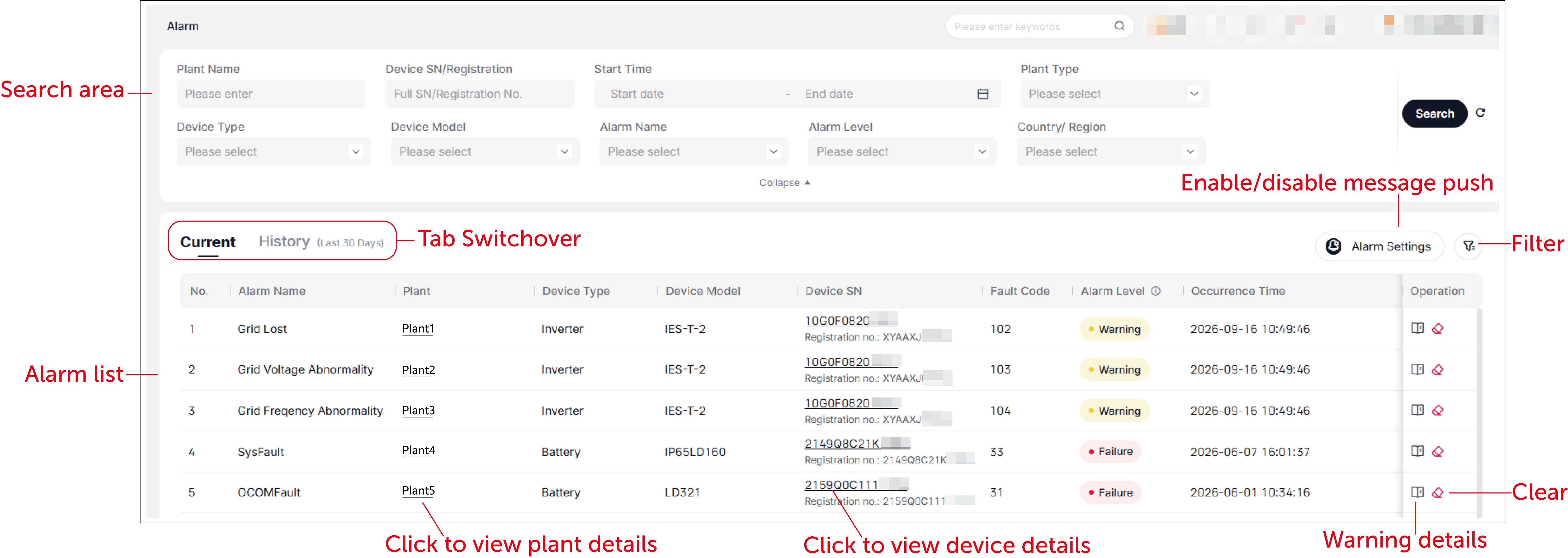
Search: Search for warning messages by plant name, complete device SN/registration number, plant/device type, or device model.
Filter: Click the filter icon on the right side, set the filter conditions (for example device type, alarm level, and occurrence time), and find out warning messages that meet the conditions. Alarms are classified into three levels: Failure, Warning, and Notice. "Failure" requires the M&O personnel to handle the issue on the site; "Warning" means that the failed device can recover automatically or restore through remote settings; "Notice" can be selectively neglected.
Alarm settings: Disable or enable the alarm and notification push.
View details: With a click of details icon in the Operation column of an alarm, you will see details of the alarm.
[Note]
- The clearance of alarm on the platform lags behind the actual situation that an alarm has been solved.
- Tap Clear to manually remove some warnings that cannot disappear automatically.
← Service Data Report →